Deploy to GitHub Pages
Now that our web app is ready to be used let’s deploy it so that it can be reached via the internet. The most obvious choice is using GitHub Pages which can be used to host static pages, for example this dev log. To make it host our Angular web app (which is a single page application) we need to do some adjustments.
Set up automatic deployment
The easiest way to automate the deployment to GitHub Pages is to use GitHub Actions.
Let’s create a GitHub Action that builds the app and deploys it to GitHub Pages.
For that we specify a workflow in .github/workflows/deploy-app-github.yml which looks like this
name: Deploy Angular App to GitHub Pages

on:
  push:
    branches:
      - main
permissions:
  contents: write
jobs:
  build-and-deploy:
    runs-on: ubuntu-latest

    steps:
      - name: Checkout Code
        uses: actions/checkout@v4

      - name: Set up Node.js
        uses: actions/setup-node@v4
        with:
          node-version: "23"

      - name: Install Dependencies and Build
        run: |
          npm ci
          npm run build -- --base-href=/open-ebike-frontend/ --configuration production

      - name: Copy 404 page
        run: |
          cp dist/open-ebike-frontend/browser/index.html dist/open-ebike-frontend/browser/404.html

      - name: Deploy to GitHub Pages
        uses: JamesIves/github-pages-deploy-action@v4
        with:
          folder: dist/open-ebike-frontend/browser
Our workflow is configured to run whenever changes are pushed to the main branch.
Let’s take a deeper look into the different steps.
- the first step checks out the code
- the second step sets up Node.js which is needed to build the app (we can use the same version as we did during development)
- the third step installs dependencies and builds the app specifying the base href to be
/open-ebike-frontendand the configuration to beproduction - the fourth step copies the index.html file into a 404.html file - this trick is needed since GitHub pages is intended to host static pages. By providing a 404.html page with the same content as our index.html file we facilitate the user to open pages with different paths
- the final step deploys the compiled app into another branch
gh-pages- this is why we need to give the workflow the permissioncontents: write
Set up GitHub Pages
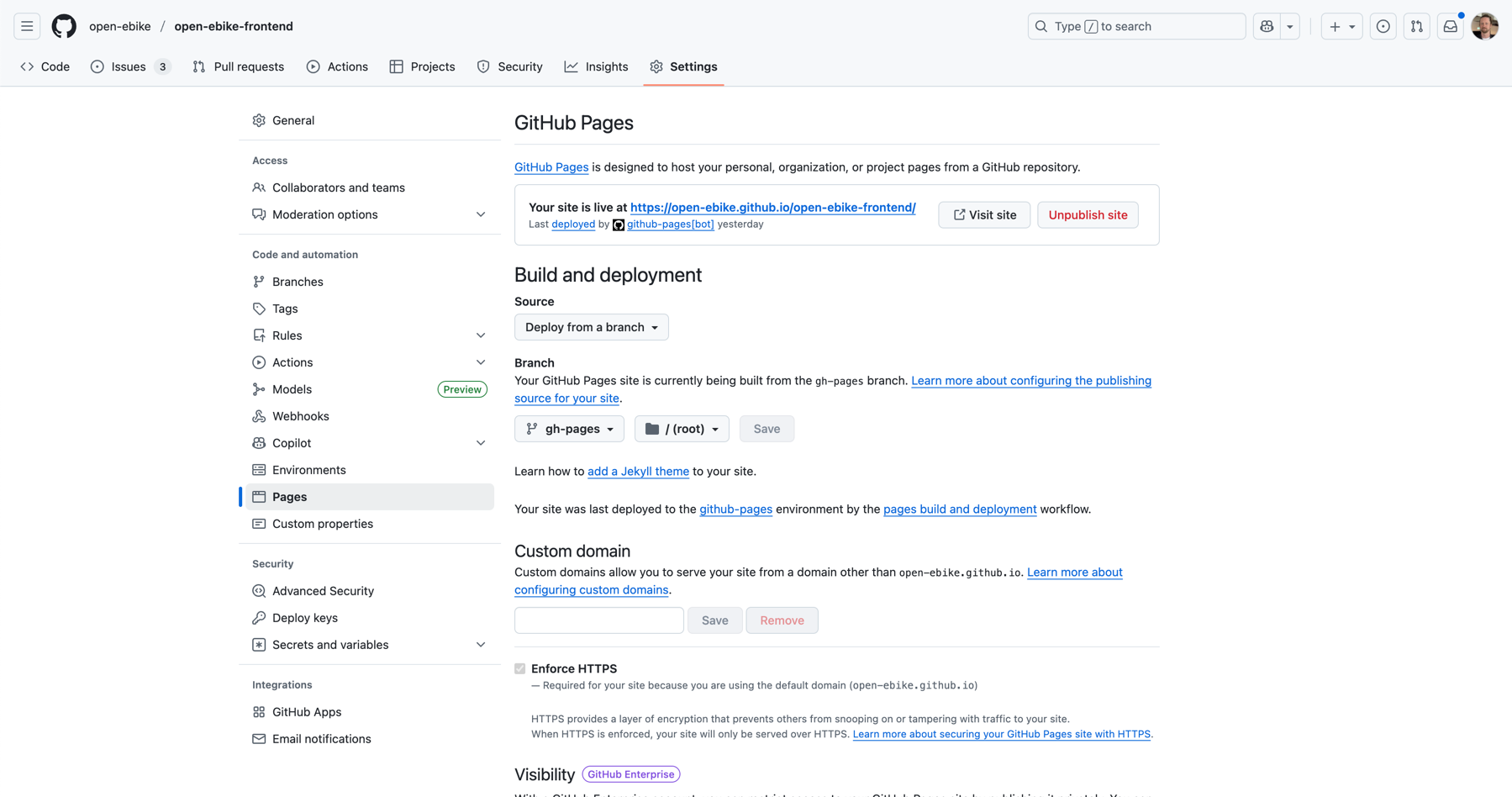
To make the deployed page available we need to configure it on the settings page of our GitHub repository.
In the Pages section we select Deploy from a branch as a source and gh-pages as a branch to deploy from.
Voilà, the web app is available at https://open-ebike.github.io/open-ebike-frontend.
Configure redirect URL
When trying to log in we notice that the Bosch login page states an indirect redirect URL.
This is due to the fact that we configured it to be http://localhost:4200 in an earlier post.

To fix this we need to register another client application at https://portal.bosch-ebike.com (as described in an earlier post) with the following settings:
- client application name: github-pages-public
- login URL: https://open-ebike.github.io/open-ebike-frontend
- redirect URL: https://open-ebike.github.io/open-ebike-frontend/*
- confidential client: no
Of course, we need to grant the newly created client application access to the data generated by our eBike via https://flow.bosch-ebike.com as described in an ealier post.
To use this client we add a separate environment configuration that will be used during the deployment.
Et voilà, the login now works.

Address the issue with same-origin policy
When trying to navigate to one of the pages we notice that there is another issue: the deployed app cannot access the Bosch eBike System APIs https://api.bosch-ebike.com.
By default, browsers enforce a same-origin policy which prevents calling resources from another server.
The server - in this case the Bosch eBike System APIs - would need enable the access via a CORS policy, for instance by sending a Access-Control-Allow-Origin header.
Since we do not have access to the server we need to find a workaround.
One simple we can try is to use cors-anywhere. With CORS anywhere we send each request of our web app to a proxy which in turn will call our desired backend. While this approach bypasses the restrictions of the same-origin policy it is not intended to be used in production.
Since this approach does not seem to work we need to find another alternative - for example proxying the server requests ourselves using cloud functions. In the next post we will deploy the app to Firebase Hosting.